From Lovable to production: Deploy your app on Sevalla
Lovable is a popular AI app builder for developers and founders. It can generate a complete website or application with prompts. For many builders, this makes Lovable the fastest way to go from idea to working product.
But as projects grow, many teams eventually want more control over their apps to integrate additional tools, optimize performance, and scale their applications. In doing this, they also need to manage deployment.
In this guide, we show you how to take a Lovable-built application and deploy it on Sevalla, a developer-first platform for running production applications without managing cloud infrastructure.
What a Lovable project actually includes
Before deploying a Lovable app anywhere else, it helps to understand what a Lovable project actually is under the hood.
Although Lovable feels like a no-code or AI builder on the surface, the applications it generates are real web applications with a normal codebase. This is why they can be exported, edited, and deployed on external infrastructure like Sevalla.
At a high level, a typical Lovable project includes the frontend application and backend services.
The frontend application
Most Lovable apps are built as modern single-page applications (SPAs). The frontend is usually generated using React and bundled with Vite, a fast build tool commonly used in modern JavaScript projects.
When you export a Lovable project, the frontend typically looks like a standard React application with files similar to this:
src/
  components/
  pages/
public/
package.json
vite.config.ts
The src directory contains the UI components and pages that make up the app. When the app is built for production, the frontend is compiled into static assets using a build command such as:
npm run buildThis produces a dist directory containing optimized HTML, JavaScript, and CSS files. These static assets are what actually get deployed to a hosting platform.
Backend services powered by Supabase
While the frontend handles the user interface, most Lovable apps also rely on backend services to manage data, authentication, and file storage.
Lovable's native backend integration is built around Supabase, which provides a collection of services that act as the application's backend. In many Lovable projects, Supabase is responsible for:
- the PostgreSQL database
- authentication and user accounts
- file storage
- real-time data updates
- edge functions or serverless logic
From the frontend's perspective, the app communicates with Supabase using environment variables such as the project URL and publishable API keys. These values are usually defined in the project's environment configuration and injected during the build process.
For developers exporting a Lovable project, this means the backend is often already a separate service, which makes it possible to move the frontend to another host without immediately migrating the database.
Before deploying a Lovable project outside the platform, check how its Supabase backend is set up. Some projects use Lovable Cloud, where the backend is managed by Lovable, while others connect to a Supabase project you own.
If you use your own Supabase project, you can usually deploy the frontend anywhere and keep using the same backend. If the project relies on Lovable Cloud, moving the backend may require additional migration steps.
Export your Lovable project
Once you understand how your Lovable project is structured, the next step is exporting it so you can deploy it outside the platform.
Lovable makes this relatively straightforward by allowing projects to be synced directly to a GitHub repository. This repository becomes the source code you'll use to deploy the app on external infrastructure like Sevalla.
To connect your project:
- Open your project in Lovable.
- Click the GitHub icon in the top right, then click the Connect GitHub button.

- Authorize Lovable to access your GitHub account.
- Click Connect Project and select your GitHub account.

Once connected, Lovable will push the project files to the repository. This gives you a complete copy of the application code outside the Lovable platform.
If your app uses backend services like Supabase, it will likely depend on environment variables such as API keys or service URLs. These values are typically defined in .env files or project settings.
Common variables may include:
VITE_SUPABASE_URL
VITE_SUPABASE_PUBLISHABLE_KEY
VITE_SUPABASE_PROJECT_ID
When deploying to another platform, these environment variables must be added to the hosting environment so the app can connect to its backend services.
Deploy your Lovable app to Sevalla
Once your Lovable project is exported and pushed to GitHub, deploying it on Sevalla is straightforward and free.
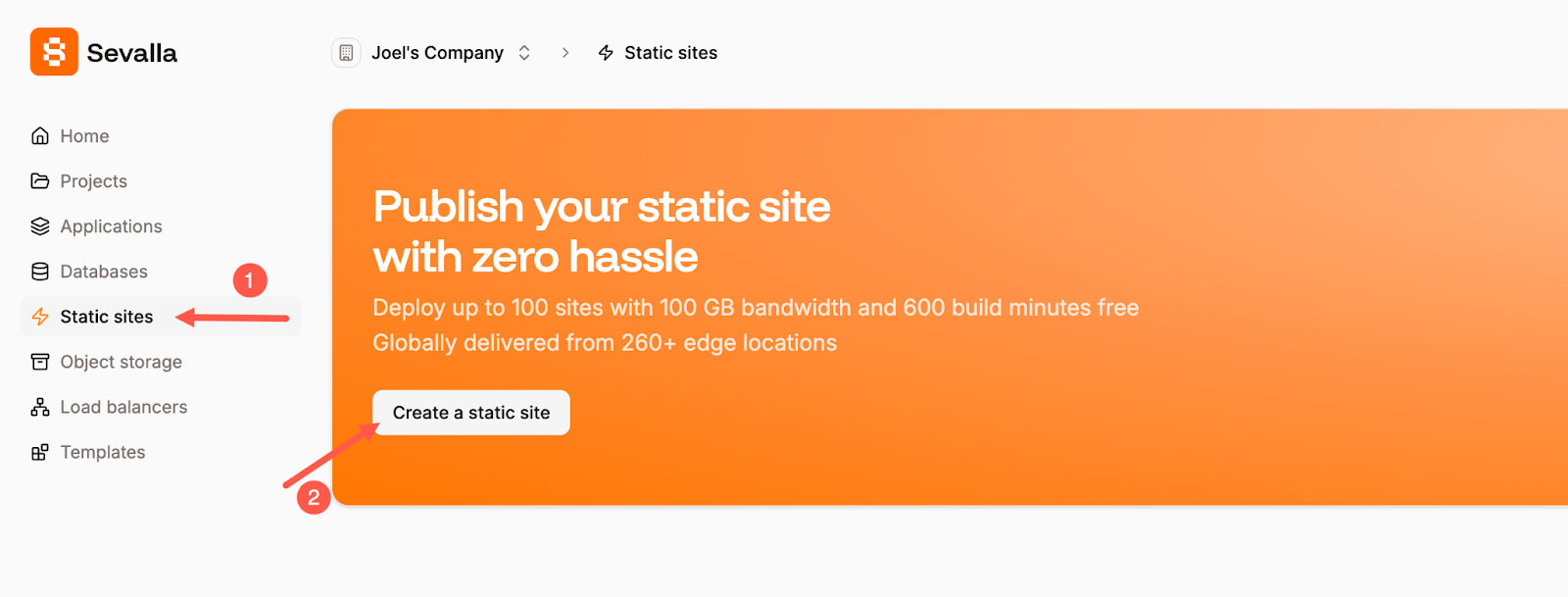
Navigate to the Static sites page and then click the Create a static site button in your Sevalla dashboard.
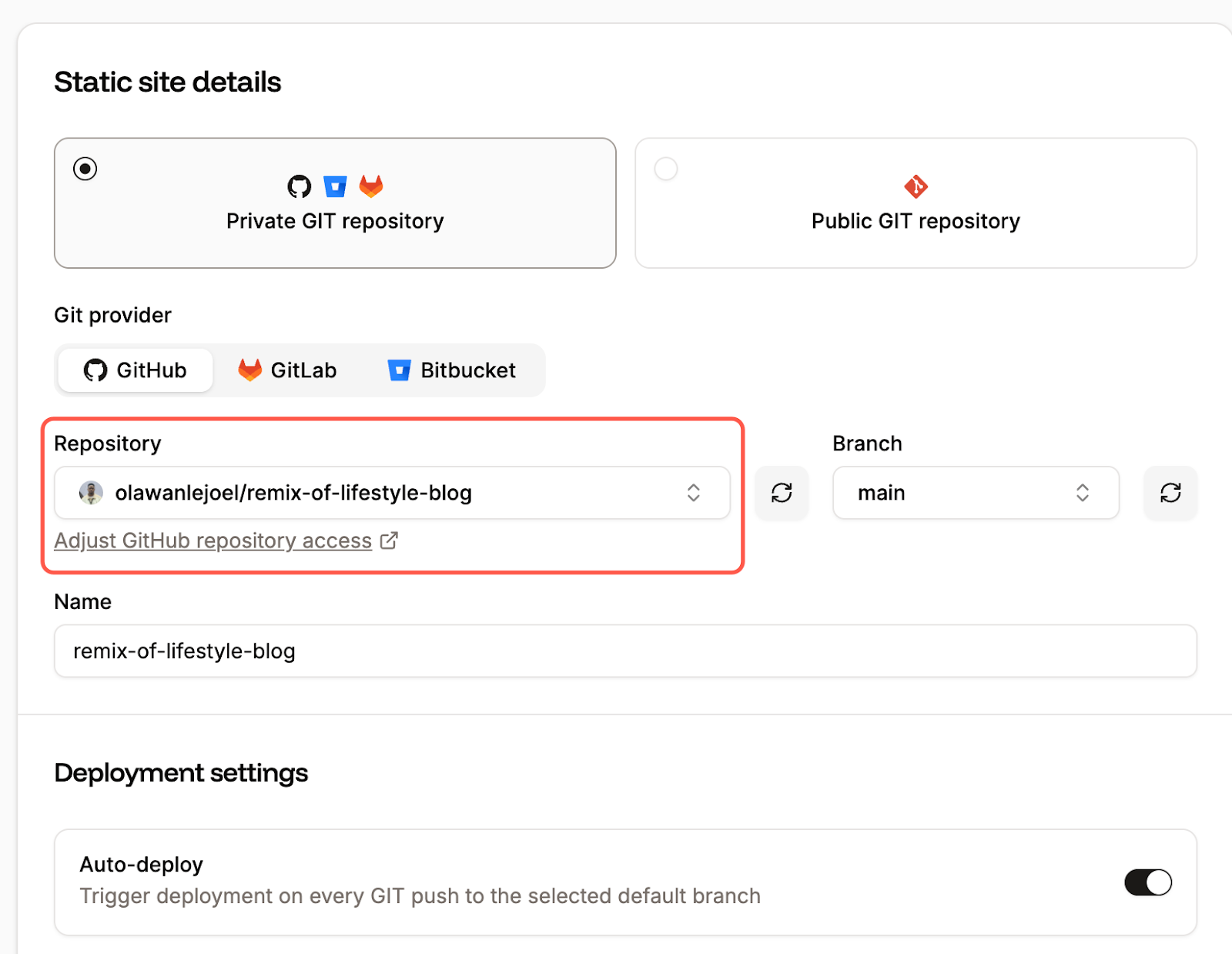
Next, connect the GitHub repository that contains your exported Lovable project.
Sevalla will automatically detect and assign your build configuration. For most Lovable projects, the build command will be:
npm run buildand the output directory will be:
distIf your project depends on environment variables, especially for Supabase, add them in Sevalla before deploying. This usually includes values such as your Supabase URL and publishable key.
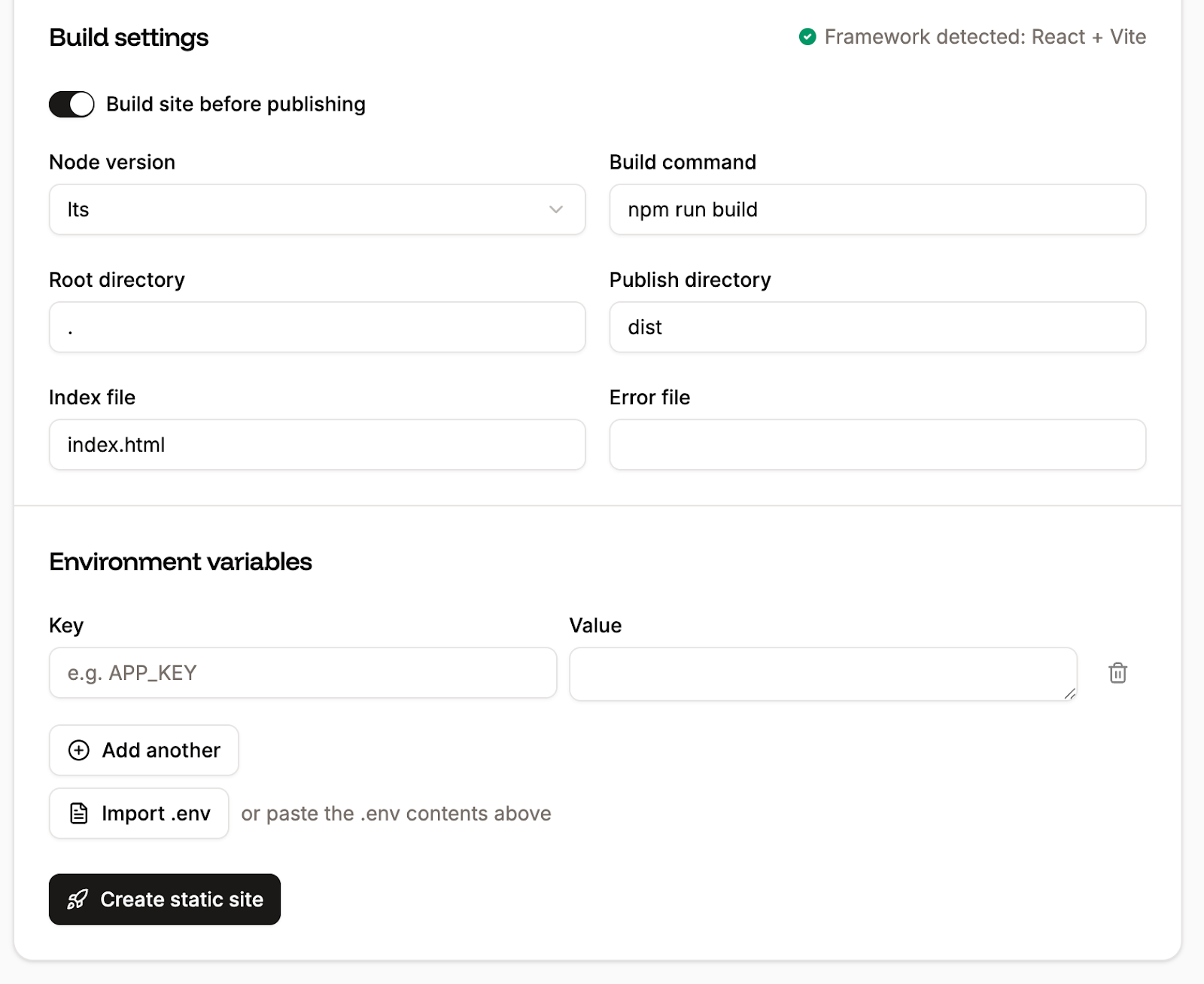
One important thing to keep in mind is that VITE_ environment variables are embedded at build time, so whenever you change them, you need to trigger a new deployment for the update to take effect.
After that, click Create static site and let Sevalla build the project. Once the deployment finishes, Sevalla will give you a live URL where the app is available.

At this point, the frontend should load the same way it did in Lovable, as long as the required environment variables are in place and the backend connection still works.
Final thoughts
Lovable makes it incredibly fast to go from an idea to a working application, but exporting your project and deploying it on Sevalla gives you greater flexibility over how that application runs in production.
As your project evolves, you can also take advantage of other Sevalla services. For example, you can add managed databases, background workers, and object storage to support more complex application features. These services can communicate with your app through Sevalla's internal networking, which allows services within the same project to connect securely without exposing them to the public internet.
Once your app is live on Sevalla, you can also connect a custom domain so users can access it through your own URL.