What is web application architecture? Breaking down a web app
The world has moved to the internet, and web applications have become the new workplaces and commercial stores. To accommodate the variety of purposes that modern web apps serve, each of them needs to be designed for high performance and customizability.
Web application architectures solve this problem.
Web application architecture defines how the various components of a web-based application are structured. This architecture is highly specific to the nature and the purpose of the web application. Choosing the wrong architecture for your web app can wreak havoc on your business.
In this guide, we will break down the concept of web application architecture and understand how it affects the end-user experience of your application. Towards the end, we will also look at some of the best practices you can implement to get the most out of your web application.
What is web application architecture?
To kick off the discussion, let's start with the definition of web application architecture.
In simple words, web application architecture is an outline of how various components of your web app interact with each other.
It can be as simple as defining the relationship between the client and the server. It can also be as complex as defining the inter-relations between a swarm of containerized backend servers, load balancers, API gateways, and user-facing single-page frontends.
That said, it's rarely about choosing the programming language in which you will write your code.
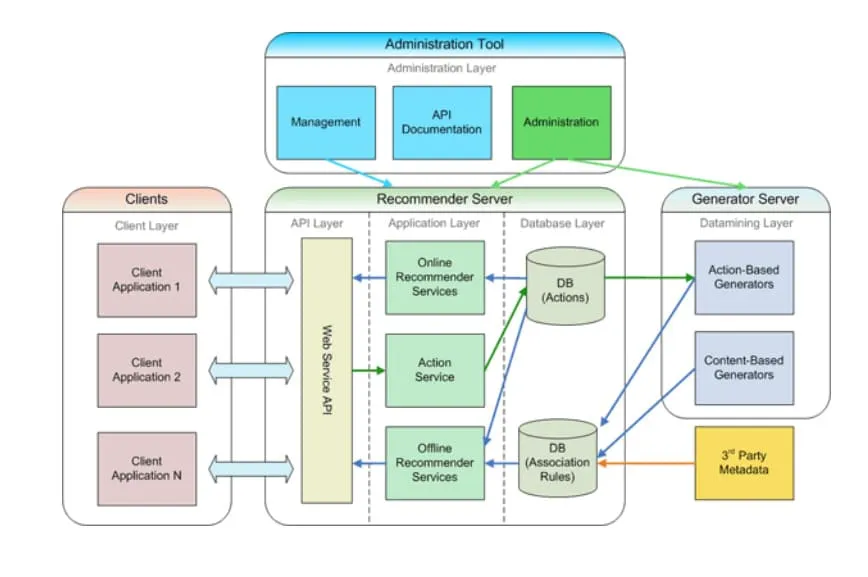
How you design your web app plays a key role in both its usability and your cost optimization. Here's what a sample web app architecture looks like on paper:
Why is web application architecture important?
Web application architecture is, without a doubt, one of the most important parts of your web application. If you choose to develop your web app with a specific architecture in mind, you are certain to receive many benefits when it comes to maintaining and growing your application.
However, choosing the right architecture amplifies these benefits further.
Here are some of the top reasons you should seriously consider adopting a web application architecture.
Adapting to business needs easily
Your app is a key gateway to your business, and business needs evolve with the changing market. To keep up, you'll want your app to be flexible enough to adapt to your changing business needs. And if you build an app without considering built-in flexibility, you're bound to spend increasing amounts of time and effort making tiny adjustments in your app down the line.
The right web application architecture already accounts for some of the changes that your business might need in the future. For instance, if you know you're building an ecommerce application that will scale and cater a wide range of services to a large number of customers one day, choosing a microservices architecture over a monolithic one would provide you with more flexibility.
On the other hand, if you're building an internal app for your company with only one or two fixed requirements, you can opt for a simpler monolith to speed up development and keep your codebase clean.
Organized development
As we mentioned earlier, the right web app architecture provides you with a more convenient roadmap for development. Architecture provides enough modularity in your system to isolate components as necessary, and you get the freedom to choose the right project structure for each of your modules and components as necessary.
If you dive into app development without an architecture in mind, you risk wasting time and money re-organizing your components and laying out new rules to help facilitate collaboration between your team members — time and money which could have otherwise been spent elsewhere.
Better codebase management
Apart from writing your app's code, you'll also spend a considerable amount of time managing it. Organizing your project files, breaking your app down into modules, and setting up custom pipelines are just a few of the tasks that require active maintenance to ensure smooth development.
The right web app architecture makes it easy for you to make changes. You get to implement component-specific best practices, separate your app's pain points from one another, and keep each feature independent and loosely coupled. It's not that these things can't be done without architecture; it's just that the right architecture makes all of it much simpler.
Following a pre-defined architecture also makes it easy for you to develop your applications faster. The right architecture combined with a sound version control strategy can enable your developers to work in parallel with each other and build features faster.
A web app architecture also future-proofs your application. Once you define a solid strategy around how to organize your app's components, you can easily migrate those components to newer technologies one by one without having to redo your entire application.
Enhanced security
Most web app architectures factor in security when structuring components. Developers can plan, ahead of time, the measures and practices to implement to improve the app's security before it's rolled out to the users.
For example, building an OTT video streaming app that offers both paid and free content using microservices makes more sense as the microservices architecture enables you to split your app into business-friendly components, such as user authentication and free or paid content streaming. If your user authentication module ever goes down, you can easily configure your app to restrict access to the paid content module until auth is up while the free content module is still available to your users.
In an alternate case where this same app was designed as a tightly-coupled monolith, a downed authentication service would mean either a downed application or paid content being made available for free — outcomes you'll want to avoid at all costs.
How does web application architecture work?
Before we talk about how web application architecture works, it's important to understand how a simple website works:
- The user enters your app's URL in the browser's address bar or clicks on a link.
- The browser looks the URL up in the DNS servers and identifies the IP address of your app.
- The browser sends an HTTP request to your app.
- Your app responds with the correct content (usually a webpage).
- The browser renders the webpage on the screen.
If you were to dive a little deeper, here's how a web app would handle a request:
- The user sends a request to your app via your frontend user interface.
- If you have a relevant cache set up, such as a CDN, it checks whether it has a valid copy of the response. If it does, it sends the cached content back to the client, and the request is complete.
- If there's no cached copy, the request is forwarded to the load balancer. In larger apps, it may pass through an API gateway first, which handles concerns like authentication and rate limiting before routing the request.
- The load balancer identifies a server instance that is available to handle the request and forwards it.
- The server instance processes the request, reads from or writes to the database, and calls any external APIs if needed.
- Once the results are collected in one place, the server sends the response back through the load balancer.
- The response reaches the user's frontend client, which displays the result. The request is then complete.
Types of web application architecture
Now that you have a basic idea of what web application architecture is let's take a detailed look at some of the popular types of web application architecture used throughout the web.
Single-page architecture
The architecture for a single-page application (SPA) is as simple as its name: The entire application is based on a single page. Once the user pulls up your app, they do not need to navigate to any other web pages. The app is made dynamic enough to fetch and render screens that meet users' requirements as they navigate through the app itself.
SPAs are great when it comes to providing a fast and seamless experience once the app has loaded. However, because the content is rendered by JavaScript in the browser, the first load can be slow, and SPAs can be harder to optimize for SEO and link previews than pages that arrive as ready-made HTML.
Pros of SPA architecture
Some of the pros of SPA architecture include:
- You can build highly interactive web apps.
- Moving between screens is fast because the browser doesn't reload the whole page.
- The frontend is a set of static files that you can serve from a CDN, while the backend only needs to provide an API.
Cons of SPA architecture
A few of the drawbacks of SPA architecture are:
- Search engines and social media previews may not see content that only appears after JavaScript runs.
- The initial render is usually slower, because the browser has to download and run the app's JavaScript first.
- You need a client-side router to give each screen its own URL and to keep the browser's back button working.
Progressive web application architecture
The Progressive Web Application (PWA) architecture usually builds on top of the single-page architecture by adding offline capabilities and the option to install your web app. A PWA uses a service worker, a script that runs in the background and can cache files and handle requests when the user is offline, and a web app manifest, which describes how the app should look when it's installed. Frameworks such as Ionic can help you build PWAs that provide users with a uniform experience across platforms.
Similar to SPAs, PWAs are smooth and seamless. With the added ability of being installed on user devices, your users get an experience closer to a native app.
At the same time, a PWA built as an SPA has the same SEO challenges, and caching with a service worker adds work: if you get it wrong, users can keep seeing an old version of your app.
Pros of PWA architecture
There are many benefits of PWA architecture, including:
- Apps run very smoothly and work across platforms from a single codebase.
- Users can install the app from the browser without going through an app store.
- Offline access and device APIs such as push notifications are available to developers.
Cons of PWA architecture
Some of the cons of PWA architecture can include:
- PWAs built as SPAs share their SEO limitations.
- Updating cached files correctly requires careful service worker logic.
- Support for installation and some device APIs still varies between browsers and operating systems, especially on iOS.
Server-side-rendered architecture
In server-side rendering (SSR), frontend web pages are rendered on a backend server after they are requested by the user. This helps to reduce the load on the client device as it receives a static HTML, CSS, and JS webpage.
SSR apps are very popular among blogs and ecommerce websites. This is because they make link management and SEO quite simple. Also, the first render for SSR apps is quite fast since the client isn't required to process any JS code to render the screens.
Pros of SSR architecture
Some of the pros of SSR architecture are listed below:
- These apps are great for SEO-heavy websites.
- The first page appears quickly because the browser receives ready-to-display HTML.
- You can pair it up with a caching service to further improve your app's performance.
Cons of SSR architecture
A few drawbacks to using SSR architecture include:
- Complex or heavy pages can take the server time to generate, which delays the first render.
- Every request needs work on the server, so your servers must be able to handle all of your traffic.
- Without client-side JavaScript, each navigation loads a new page from the server, so highly interactive interfaces need an isomorphic approach (covered below).
Pre-rendered applications architecture
Pre-rendered applications architecture is also known as static site generation architecture. In this architecture, the frontend web pages of the app are pre-generated and stored as plain HTML, CSS, and JS files on the server. Once a user requests for a page, it is directly fetched and shown to them. This makes the web app very fast, with minimal load times of any type. However, this architecture adds to the build time of the app since the web pages are rendered during the build process.
Pre-rendered web apps are great for when you are looking to generate static content such as blogs or product details that don't change often. You can also make use of templates to simplify your web page design. However, content that's different for every request can't be pre-rendered. For example, a search page that takes the query in its path (something like https://myapp.com/search/foo+bar) has infinite possible routes, so they can't all be generated during the build (and it doesn't make sense to do so either).
You can still add dynamic features to a pre-rendered site with client-side JavaScript. For example, the search page can be a single static page that reads the query from the URL (https://myapp.com/search?q=foo+bar) and fetches results from an API in the browser.
Pros of pre-rendered architecture
A few of the top benefits of pre-rendered applications architecture are:
- Web pages are generated in pure HTML, CSS, and JS; hence their performance is similar to that of apps built using vanilla JS.
- If you know your app's all possible routes, SEO becomes super easy.
Cons of pre-rendered architecture
As with any architectural model, pre-rendered has its share of drawbacks:
- Content that changes per request or per user can't be pre-rendered; it has to be fetched in the browser.
- Changing content means rebuilding and redeploying the site, although some frameworks can regenerate only the pages that changed.
Isomorphic application architecture
Isomorphic apps (also called universal apps) are a mixture of server-side-rendered apps and SPAs. Such apps are first rendered on the server as a normal server-side-rendered app. Once the page reaches the browser, the app hydrates: the JavaScript attaches event handlers to the existing HTML and takes over rendering. This essentially turns the app into a single-page application. Frameworks such as Next.js, Nuxt, and SvelteKit work this way.
Isomorphic brings the best of both worlds together. You get super-fast processing and user interface on the client, thanks to the SPA. You also get quick initial render and full-fledged SEO and linking support, thanks to the server-side rendering.
Pros of isomorphic architecture
Here are just some of the benefits to using isomorphic application architecture:
- Isomorphic apps have super quick initial render and full support for SEO.
- These apps also perform well on the client since they turn into a SPA after loading.
Cons of isomorphic architecture
Some of the cons of isomorphic application architecture can be:
- Setting up such an app requires skilled talent, because code runs in two environments, the server and the browser.
- The browser still downloads the JavaScript for the page to hydrate it, so heavy pages can feel ready before they respond to clicks.
- Options of tech stack are limited when it comes to designing an isomorphic app. You only get to choose from a handful of (mostly) JS-based libraries and frameworks.
Service-oriented architecture
The service-oriented architecture is among the most popular alternatives to the traditional monolith way of building apps. In this architecture, the web apps are broken down into services that represent a functional unit of business each. These services are loosely coupled together and interact with each other via the medium of message passing.
Service-oriented architecture adds stability and scalability to your application tech stack. However, the size of services in SOA is not clearly defined and is usually tied to business components, not technical components; hence maintenance can sometimes be an issue.
Pros of service-oriented architecture
The main benefits of service-oriented architecture include:
- This architecture helps to build highly scalable and reliable apps.
- Components are reusable and are shared to enhance development and maintenance efforts.
Cons of service-oriented architecture
Here's a list of potential drawbacks to using service-oriented architecture:
- SOA apps are still not 100% flexible since the size and scope of each service are not fixed. There can be services the size of enterprise applications that can be difficult to maintain.
- Component sharing introduces dependencies between services.
Microservices architecture
The microservices architecture evolved from the service-oriented architecture to address some of its issues. Microservices are even more modular components that fit together to build a web app. However, microservices focus on keeping each component small and with a bounded context. Bounded context essentially means that each microservice has its code and data coupled together with minimal dependencies on other microservices.
The microservices architecture is a strong fit for large apps built by several teams, because each team can develop, deploy, and scale its services independently. However, running many services adds work: they communicate over the network, each needs its own deployment pipeline and monitoring, and data is spread across services. Hence it might not suit smaller use cases, and many successful apps start as a monolith and split out services only when they need to.
Pros of microservices architecture
Some pros of microservices architecture include:
- App components are highly modular, independent, and can be re-used to a greater extent than those of the service-oriented architecture.
- Each component can be scaled independently to meet varying user traffic.
- When designed for it, a failure in one service doesn't take down the whole app.
Cons of microservices architecture
Some drawbacks of microservices architecture are:
- For smaller projects, the microservices architecture might require too much effort to maintain.
- Network calls between services add latency and new ways for requests to fail.
- Debugging a request that passes through several services requires distributed tracing and centralized logging.
Serverless architecture
The serverless architecture is another hot entrant in the world of web app architectures. This architecture focuses on breaking down your application in terms of the functions that it is supposed to carry out. Then these functions are hosted on FaaS (Function-as-a-Service) platforms as functions that are invoked as and when requests come in.
Unlike most other architectures on this list, apps built using the serverless architecture do not stay running all the time. They behave just like functions would do — wait for being called, and upon being called, run the defined process and return a result. Due to this nature, they cut down on maintenance costs and are highly scalable without much effort. However, it is difficult to carry out long-running tasks using such components.
Pros of serverless architecture
Here are the key benefits of serverless architecture:
- Serverless apps scale automatically with incoming traffic, without you managing servers.
- Such apps can make use of the pay-per-use pricing model of serverless platforms to reduce infrastructure costs.
- Serverless apps are quite easy to build and deploy since all you have to do is write a function and host it on a platform like AWS Lambda or Cloud Functions for Firebase.
Cons of serverless architecture
Below are some of the drawbacks to serverless architecture:
- Long-running tasks can be costly to do on such an architecture.
- When a function hasn't run for a while, or traffic grows and the platform needs more instances, the platform has to start a new instance before it can handle the request. This is known as a cold start, and it can slow down responses for your users.
Layers of web application architecture
While web application architectures that you saw above might all look quite different from each other, their components can be logically grouped together into definite layers that help achieve a business goal.
Presentation layer
The presentation layer accounts for everything in a web app that's exposed to the end-users. Primarily, the presentation layer is composed of the frontend client. However, it also incorporates any logic that you have written on your backend to make your frontend dynamic. This gives you the room to serve your users with UI custom-tailored to their profile and requirements.
Three fundamental technologies are used to build this layer: HTML, CSS, and JavaScript. HTML lays out your frontend, CSS styles it, and JS puts life into it (i.e., controls its behavior when users interact with it). On top of these three technologies, you can use any kind of framework to help make your development easy. Some common frontend libraries and frameworks include React, Next.js, Vue, Angular, and Svelte.
Business layer
The business layer is responsible for holding and managing your app's working logic. It is usually a backend service that accepts requests from the client and processes them. It controls what the user can access and determines how the infrastructure is utilized to serve user requests.
In the case of a hotel booking app, your client app serves as a portal for users to type hotel names and other relevant data. However, as soon as the user clicks on the search button, the business layer receives the request and kicks off the logic for looking for available hotel rooms that match your requirements. The client then just receives a list of hotel rooms without any knowledge of how this list was generated or even why the list items are arranged in the way that they have been sent.
The presence of such a layer ensures that your business logic is not exposed to your client and, ultimately, users. Isolating the business logic helps immensely in sensitive operations such as handling payments or managing health records.
Persistence layer
The persistence layer is responsible for controlling access to your data stores. This acts as an added layer of abstraction between your datastores and your business layer. It receives all data-related calls from the business layers and processes them by making secure connections to the database.
This layer usually consists of a database server. You can set this layer yourself by provisioning a database and a database server in your on-prem infrastructure or opt for a managed database service, such as those from AWS, Google Cloud, and Microsoft Azure, or Sevalla's Database Hosting.
Web application components
Now that you understand what goes into a web application architecture let's take a detailed look into each of the components that compose a web app. We'll group this discussion into two major headings — server-side components and client-side components, or backend and frontend components.
Server-side components
Server-side components are those that reside on the backend of your web application. These are not exposed directly to the users and hold the most important business logic and resources for your web app.
DNS & routing
DNS is responsible for controlling how your app is exposed to the web. DNS records are used by HTTP clients, which could be a browser as well, to find and send requests to your app's components. DNS is also used by your frontend clients internally to resolve the location of your web servers and API endpoints to send requests and process user operations.
Load balancing is another popular component of web application architecture. A load balancer is used to distribute HTTP requests between multiple identical web servers. The intent behind having multiple web servers is to maintain redundancy that helps increase fault tolerance as well as distribute traffic to maintain high performance.
API endpoints are used to expose backend services to the frontend application. These help to facilitate communication between the client and the server, and sometimes even between multiple servers as well.
Data storage
Data storage is a crucial part of most modern applications as there are always some app data that needs to be persisted across user sessions. Data storage is of two types:
- Databases: Databases store your app's live data, such as user accounts and orders, and are optimized for the fast reads and writes your app makes while serving users.
- Data warehouses: Data warehouses store large amounts of historical data for analysis. Your app rarely queries them directly, but they're processed regularly to generate business insights.
Caching
Caching is an optional feature often implemented in web app architectures to serve content faster to the users. A large portion of app content is often repetitive for some amount of time, if not always. Instead of accessing it from a data store and processing it before sending it back to the user, it is often cached. Here are the two most popular types of caching used across web applications:
- Data caching: Data caching introduces a way for your app to easily and quickly access regularly used data that does not change often. Technologies such as Redis and Memcached enable caching data to save on expensive database queries just to retrieve the same data again and again.
- Web page caching: A CDN (Content Delivery Network) caches web pages and files on servers close to your users. Similar to how only data that does not change often is cached, pages that are the same for every user are the best candidates. Server-side-rendered pages can be cached too, for example, with
Cache-Controlheaders, as long as they aren't personalized for each user.
Jobs and services
Apart from exposing an interface to users (frontend) and handling their requests (backend), there is another slightly less popular category of web app components. Jobs are background services that complete tasks that don't need to finish before you respond to the user, such as sending emails or processing uploaded files. Usually, your app adds them to a queue, and background workers process them.
Cron jobs are those that run on a fixed schedule again and again. These jobs are scheduled on the backend to run maintenance routines automatically at set times. Some common example use-cases for these include deleting duplicates/old records from the database, sending out reminder emails to customers, etc.
Client-side components
Client-side components are those that are exposed to your users either directly or indirectly.
There are mainly two types of components in this category.
Frontend user interface
The user interface is the visual aspect of your application. It is what your users see and interact with in order to access your services.
The frontend interface is mostly built on three popular technologies: HTML, CSS, and JavaScript. The frontend user interface can be an application in itself with its own software development life cycle.
These user interfaces don't house a lot of your business logic since they're exposed directly to your users. Anyone can read the code of your frontend application in their browser, so a malicious user can learn how your business works and look for weaknesses, such as API calls they can abuse to access data they shouldn't.
Also, since the frontend user interface is exposed directly to users, you'll want to optimize it for minimal loading time and responsiveness. Sometimes this can help you provide a better experience to your users, thereby increasing your business growth.
Client-side business logic
Sometimes you might need to store some business logic on your client in order to perform simpler operations quickly. Client-side logic that usually resides inside your frontend application can help you skip the trip to the server and provide your users with a faster experience.
This is an optional feature of the client-side components. In some cases, the app's business logic is stored entirely on the client-side (especially when building without a traditional backend server). Modern solutions such as BaaS help you access common operations such as authentication, data storage, file storage, etc., on the go in your frontend app.
There are ways to obfuscate or minify this code before rolling it out to your users to make it harder to reverse-engineer. However, never rely on client-side logic for anything that must be enforced, such as prices, permissions, or validation. Users can change any code that runs in their browser, so your backend has to check these rules again.
Models of web application components
There are multiple models of web application architectures, each based on how web servers connect to their data stores.
One server, one database
The simplest model of all is one web server connecting to one database instance. Such a model is easy to implement and maintain, and going to production with it is also fairly effortless.
Due to its simplicity, this model is suitable for learning and for small experimental applications that will not be exposed to high traffic. Novice developers can easily set up and tinker with these apps to learn the fundamentals of web app development.
However, this model has no redundancy, so it's a risky choice for apps where downtime is costly. An issue in either the server or the database can result in downtime and lost business.
Multiple servers, one database
This model takes the application up a notch by setting up multiple servers for redundancy with a single common database instance.
Since a user's requests can reach any of the web servers, the web servers are designed to be stateless. This means the servers don't keep data, such as user sessions, in their own memory between requests; they merely process it and store it in the database or a shared cache, so any server can handle any request.
Apps made using this model are certainly more reliable than those with the previous model, as the presence of multiple web servers adds to the fault tolerance of the web app. However, since the database is still one common instance, it is the weakest link in the architecture and can be a source of failure.
Multiple servers, multiple databases
This model is one of the most common, traditional models of designing web applications.
In this case, you deploy your application logic as multiple identical web server instances clubbed together behind a load balancer. Your data store is also maintained across multiple database instances for added fault tolerance.
You can also choose to split your database among the available instances to enhance performance or maintain duplicates of the entire data store for redundancy. In either case, failure in any one instance of your database will not lead to a complete application outage.
This model is highly appreciated for its reliability and scalability. However, developing and maintaining apps using this model is relatively complicated and requires costly, seasoned developers. As such, this model is only suggested when you're building on a large scale.
App services
While the three models mentioned above are well suited to monolithic applications, there's another model for modular applications.
The application services model breaks down an app into smaller modules based on business functionality. These modules could be as small as a function or as large as a service.
The idea here is to make each business feature independent and scalable. Each of these modules can connect to the database on its own. You can even have dedicated database instances to match your module's scalability needs.
Among non-monolithic apps, this model is quite popular. Legacy monoliths are often migrated to this model to make use of its scalability and modularity benefits. However, managing apps built on such a model often requires seasoned developers, especially experience in DevOps and CI/CD.
Best practices for web application architecture
Here are some best practices you can implement in your web application project to get the most out of your chosen web app architecture.
1. Make your frontend responsive
This can't be stressed enough: Always aim for responsive frontends. No matter how huge and complex your web app internally is, it's all exposed to your users via frontend web pages, apps, and screens.
If your users find these screens to be unintuitive or slow, they won't stick around long enough to view and admire the engineering marvel that is your web app.
Therefore, designing accessible, easy-to-use, lightweight frontends is very important.
There are ample UI/UX best practices available around the web to help you understand what works best for your users. You can find professionals skilled at making user-friendly designs and architectures that can enable your users to get the most out of your apps.
We advise giving serious thought to your frontend's responsiveness before rolling out your product to your users.
2. Monitor load times
Apart from being easy to understand, your frontends also need to be quick to load.
According to Portent's 2022 research, the highest ecommerce conversion rates occur on pages that load in 1 to 2 seconds. And in Unbounce's 2019 Page Speed Report, nearly 70% of consumers admitted that page speed impacts their willingness to buy from an online retailer.
When designing mobile-native applications, you can't usually be certain of your users' device specifications. Any device that doesn't meet your app's requirements is typically declared to not support the app.
However, this is quite different with the web.
When it comes to web applications, your users could be using anything from the latest MacBook Pro to an older budget phone on a slow network to view your app. Optimizing your frontend experience for such a wide range of users can be tough at times.
Tools like Lighthouse and Google PageSpeed Insights come to mind when talking about frontend performance. You should use such tools to benchmark your frontend app before deploying it in production. Most such tools provide you with a list of actionable tips to help improve your app's performance as much as possible.
The final 5–10% of the app's performance is usually specific to your use case and can only be fixed by somebody who knows your app and its technologies well. It never hurts to invest in web performance!
3. Consider a PWA when your users benefit from it
As discussed earlier, PWAs provide a uniform experience across major platforms from a single codebase. If your users would benefit from offline access, installing your app on their home screen, or push notifications, a PWA can give them an experience close to a native app without you building and maintaining separate iOS and Android apps.
If your app is mostly content, such as a blog or a marketing site, you may not need those capabilities, and a server-rendered or pre-rendered site will be simpler.
4. Keep your codebase clean and succinct
A clean codebase can help you spot and resolve most issues before they cause damage. Here are some tips you can follow to ensure that your codebase isn't causing you any more trouble than it should.
- Focus on code reuse: Maintaining copies of the same code throughout your codebase is not only redundant, but it can also cause discrepancies to creep in, making your codebase difficult to maintain. Always focus on re-using code wherever possible.
- Plan your project structure: Software projects can grow very large with time. If you don't begin with a planned structure of code organization and resources, you might end up spending more time finding files than writing useful code.
- Write unit tests: Every piece of code has a chance of breaking. Testing all of it manually is not feasible, so you need a fixed strategy for automating tests for your codebase. Test runners and code coverage tools can help you identify if your unit testing efforts are yielding the desired results.
- High modularity: When writing code, always focus on modularity. Writing code that is tightly coupled to other pieces of code makes it difficult to test, re-use, and alter when needed.
5. Automate your CI/CD processes
CI/CD stands for Continuous Integration/Continuous Deployment. CI/CD processes are crucial to the development of your application as they help you to build, test, and deploy your project with ease.
However, you don't want to have to run them manually each time. You should instead set up pipelines that trigger automatically based on your project's activities. For instance, you could set up a pipeline that runs your tests automatically whenever you commit your code to your version control system. There are plenty of more complex use cases, too, such as generating cross-platform artifacts from your code repository whenever a release is created. Hosting platforms can also handle the deployment step for you. For example, Sevalla can deploy your app automatically every time you push to your Git repository.
The possibilities are endless, so it's up to you to figure out how you can make the most out of your CI/CD pipelines.
6. Incorporate security features
Most modern apps are made of multiple components. Take the following app as an example:
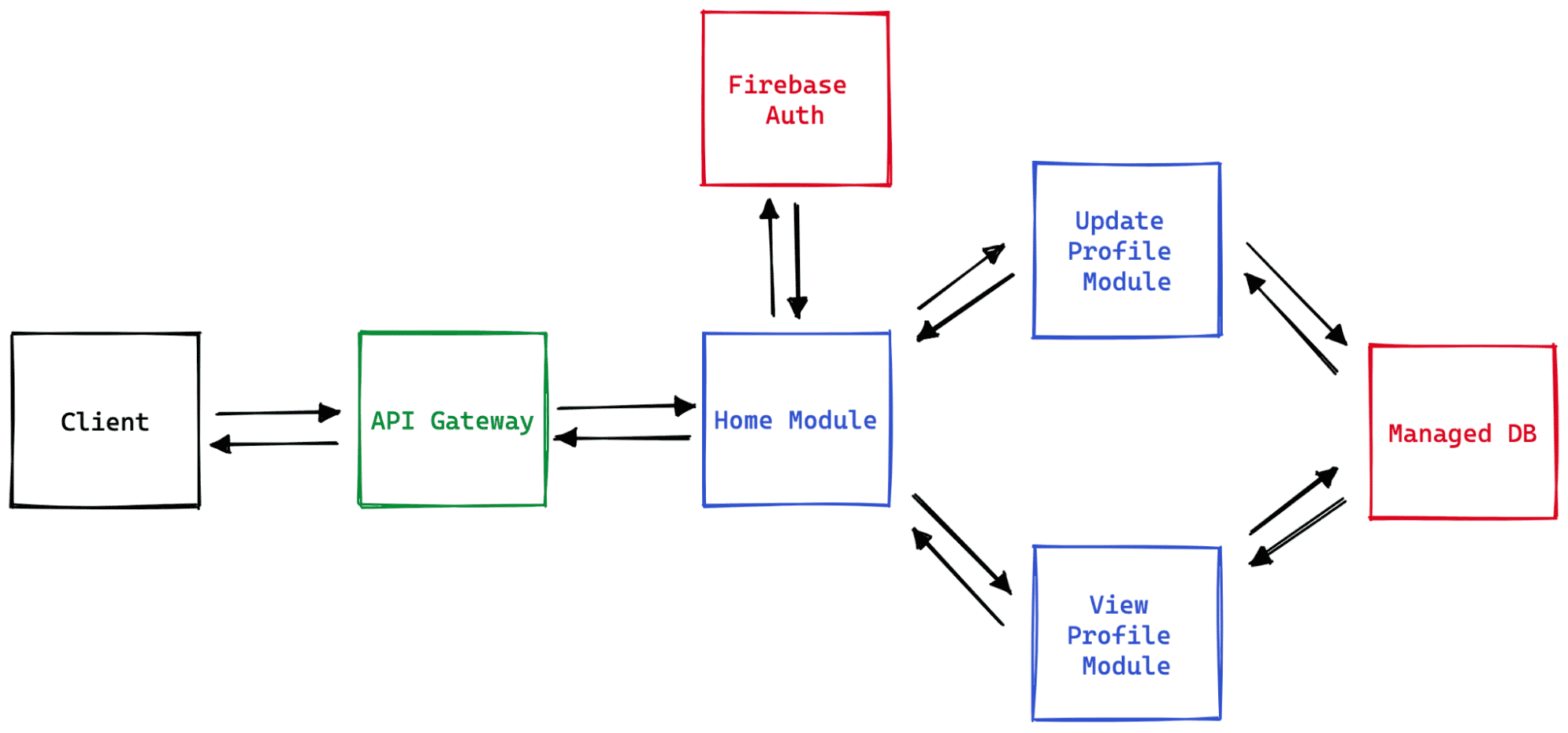
Client requests are routed to the app through an API gateway. While this one currently only allows direct requests to the home module of the app, in the future, it could allow for access to more components without going through the home module.
Next up, the home module checks an external authentication BaaS before allowing access. Once authenticated, the client can access the "Update Profile" or "View Profile" pages. Both these pages interact with a common, managed database solution that handles the profile data.
As you can see, the application seems like a very basic and minimal version of an online people directory. You can add/update your own profile or view other profiles available.
Here's a quick legend of the various components in the architecture:
- Blue boxes: App modules, which are possibly hosted as microservices or serverless functions.
- Red boxes: External BaaS components that provide for authentication and database.
- Green box: Routing component that moderates incoming requests from the client.
- Black box: Your client application exposed to the user.
The components of each of the colors above are vulnerable to various kinds of security threats. Here are a few security constructs you can put in place to minimize your exposure:
- App modules (blue): Since these are serverless functions, here are a few tips to strengthen their security:
- Isolate app secrets and manage them independently of your source code
- Maintain access controls through IAM services
- Improve your testing efforts to also look for security threats through techniques such as SAST
- External services (red):
- Set up access controls through their IAM modules to regulate access
- Opt for API rate limiting
- For services such as databases, set up finer control permissions, such as who can access the profiles' data, who can view the users' data, and more. Many services, like Firebase, provide a detailed set of such rules.
- Routing component (green):
- Like all other components, implement access controls
- Set up authorization
- Double-check on standard best practices such as CORS
- Client:
- Ensure that no app secrets are available to your client
- Obfuscate your client code to make reverse engineering harder, but enforce every rule on the backend too
While these are just a handful of suggestions, they stand to make the point that app security is complicated, and it's your responsibility to ensure that you're not leaving any loose ends for attackers to pull on. You cannot rely on a central security component to protect your business; app security is distributed across your app architecture.
7. Collect user feedback
User feedback is a crucial tool to understand how well your app is doing in terms of business and technical performance. You can build the lightest and the smoothest app in the world, but if it doesn't let your users do what they expect, then all your efforts go down the drain.
There are multiple ways to collect user feedback. While a quick and anonymized survey is the conventional approach, you could also go for a more sophisticated solution, such as a heat map of your users' activity.
The choice of feedback collection method is less important than taking action on the collected feedback. Customers love businesses that listen to their problems.
Summary
The web is a huge playground of a variety of applications, each designed in its own unique way. Multiple types of architectures make way for web apps to diversify, thrive, and offer services to users all across the globe.
In this guide, we broke down the different models of web app architecture and showed you how crucial they are to an application's growth.
Whichever architecture you choose, Sevalla can run its pieces: Application Hosting for your backend services and background workers, Static Site Hosting for pre-rendered frontends, and Database Hosting for your persistence layer.